Read time :
How to Set-up Offline Conversion Tracking With Google Ads : A Complete 2026 Guide for B2B Marketers
Connect Google Ads to Salesforce with offline conversion tracking. Capture GCLIDs, sync CRM data, and attribute real revenue to your campaigns



When paid media, marketing, and sales reports are disconnected, you end up relying on spreadsheets and missing attribution. Offline conversion tracking helps you accurately assign credit to the right campaigns.
This guide explains what offline conversion tracking is, how it works in a privacy-first world, and how to set it up in Google Ads. We’ll also go over Enhanced Conversions, GCLID tracking, and how to integrate with Salesforce and HubSpot.
To close the gap between ad clicks and revenue, we will start by explaining why you need the right tracking system in place to record the movements of your qualified, sales-ready leads that result in revenue.
What is Offline Conversion Tracking?
Offline conversion tracking is the process of attributing marketing campaigns, especially paid ads, to sales or actions that happen outside the digital channels. These may include:
- Phone sales
- In-person purchases
- Signed contracts
- Sales meetings booked outside the website
By capturing unique identifiers, such as GCLID, and syncing with CRM or POS systems, marketers can create a feedback loop by sending these offline outcomes back to ad platforms to optimize campaigns basedon real revenue, rather than just clicks or form submissions.
Why Offline Conversion Tracking is Essential
While SEO and paid media continue to drive website traffic and leads, the biggest challenge for performance marketers remains connecting online engagements to offline sales.
Traditional conversion tracking stops at the last click or an eventual form fill. But what about when a lead signs a contract after a call, books a demo offline, or makes a purchase in-store? That's where offline conversion tracking comes into play.
Offline conversion tracking with Google Ads enables you to close the loop, aligning your ad spend with actual revenue, allowing you to move beyond reporting just on leads generated.
ROI transparency is king in every organization, and ensuring your team can track where offline revenue comes from and further enhance your online campaigns, as well as more accurately report on revenue sources, is essential for marketers and SEO strategists alike.
Offline Conversions and SEO: Why It Matters for Organic Strategy Too
Offline tracking is often associated with paid media, but it also has a massive impact on your SEO strategy. Knowing which content leads to real-world conversions helps you prioritize high-value keywords and optimize your editorial calendar.
Benefits for SEO:
- Attribute leads from blog articles or organic pages that result in offline sales.
- Identify high-converting search intents.
- Align SEO performance with pipeline and revenue, not just pageviews.
Offline insights provide your SEO team with the data they need to drive not just traffic, but also sales-qualified leads that lead to revenue.
How Offline Conversion Tracking Works in Google Ads
Offline conversion tracking connects Google Ads engagements to real-world actions through unique click identifiers and synced data uploads.
Key Concepts:
- GCLID (Google Click ID): A unique identifier appended to each ad click.
- Data Flow: Click on an ad → lead fills out a form (GCLID captured) → CRM logs lead → sale happens offline → conversion uploaded back to Google Ads.
- Upload Options: Manual CSV uploads or automated API integrations.
- Enhanced Conversions for Leads (ECL): Privacy-safe alternative when GCLID isn't available.
By syncing your CRM with Google Ads, you can ensure that you're not just tracking clicks, but also going the extra mile and measuring closed deals.
How to Set Up Manual Offline Conversion Tracking in Google Ads
If you're not ready for API automation, you can use Google Ads' manual CSV upload method to track offline conversions.
Alongside GCLIDs, make sure every campaign URL is tagged properly, use this UTM campaign builder to generate consistent UTM tags at scale.
Steps:
- Capture the GCLID when someone submits a lead form on your site.
- Store the GCLID in your CRM associated with the lead.
- Create a conversion action in Google Ads (see next section).
- Export a CSV file with the required format: Google Click ID, Conversion Name, Conversion Time, Conversion Value.
- Go to Google Ads > Goals > Conversions > Uploads.
- Upload your CSV file and review matching results.
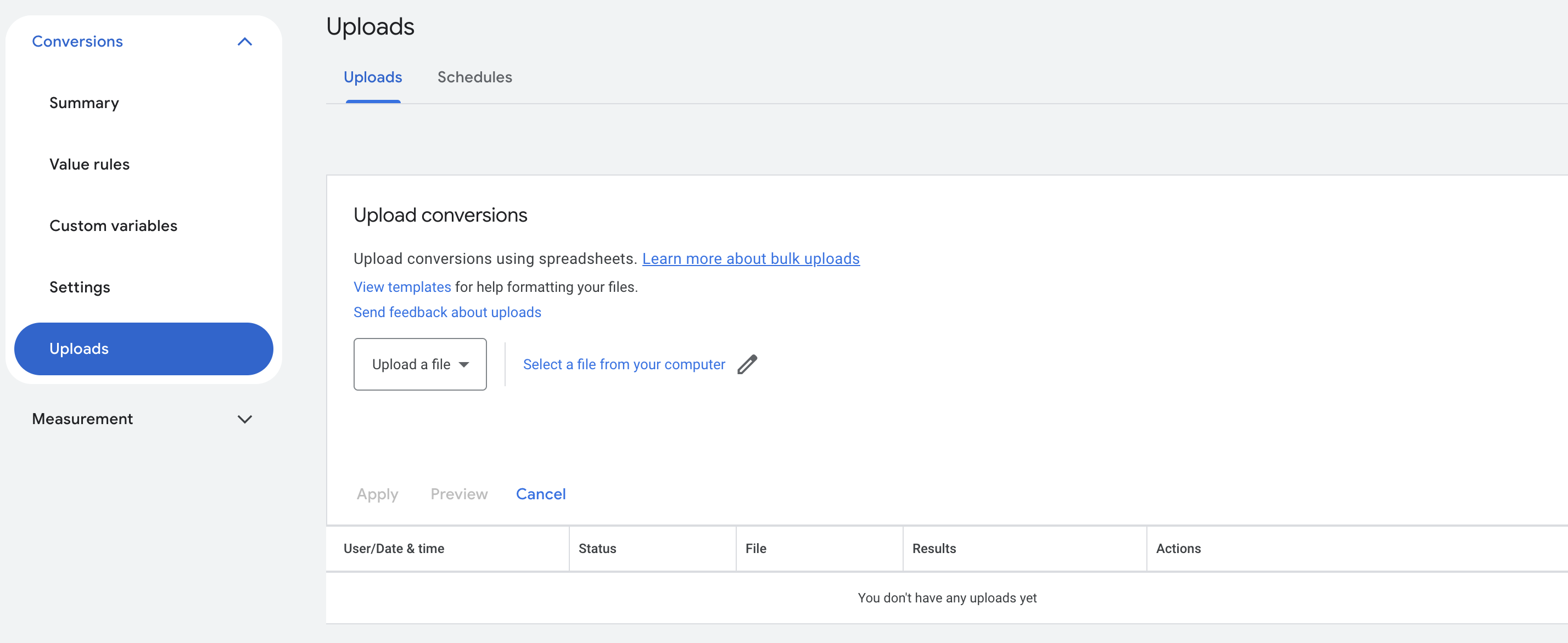
This method helps attribute offline actions to specific campaigns and keywords even without full automation.
Creating or Importing Conversion Actions in Google Ads
Before uploading offline conversions, you must create a corresponding conversion action in your Google Ads account.
How to Create a Conversion Action:
- Go to Tools & Settings > Conversions.
- Click the + New conversion action button.
- Choose Import as the source.
- Select Other data sources or CRMs and choose "Track conversions from clicks."
- Set up your conversion details:
- Name (e.g. "Offline Deal Closed")
- Category (e.g. Purchase or Lead)
- Value, Count, and Attribution settings
- Save the conversion action. You can now start uploading matching conversions.

Ensure that the conversion name in your CSV matches the one defined here precisely.
CRM Integration for Offline Conversion Tracking
Your CRM is where leads turn into opportunities and deals are finalized. Connecting your CRM with Google Ads is essential for tracking offline conversions.
Key Actions:
- Capture and store GCLID in your CRM when a form is submitted.
- Create custom fields to track lead stage and conversion status.
- Use tools like Zapier, Heeet.io, or Salesforce native integrations to push conversion data.
- Match leads using email, phone number, or click ID.
This CRM-to-Google Ads connection turns your surface-level ad reporting into revenue-driven insights.
Best Practices for Tracking Offline Conversions Like a Pro
To avoid lost data and imprecise attribution, it's crucial to use best practices from the get-go.
Checklist:
- Always store GCLID in form submissions.
- Create a CRM workflow to update conversion status.
- Upload conversions regularly (daily, hourly, or near real-time).
- Set up naming conventions for leads and conversions.
- Keep within Google’s upload window (usually 90 days).
- Ensure user privacy and GDPR compliance.
These minor operational tweaks can significantly impact your offline tracking accuracy.
Why Automating CRM-to-Google Ads Conversion Uploads Is Better
Manual uploads can work, but automating the sync between your CRM and Google Ads is the most efficient and reliable approach for several reasons:
Benefits of Automation:
- Saves time and reduces errors: No need to manually export, format, and upload CSVs.
- Real-time or scheduled updates: Send conversion data automatically as deals close or stages change.
- Improves campaign optimization: Google Ads utilizes conversion data to adjust bidding and targeting more efficiently and quicker than you can.
- Scales with volume: Whether you close 10 or 10,000 deals a month, automated pipelines handle it effortlessly.
- Ensures consistency: Automated workflows prevent mismatches and formatting issues that can cause rejected conversions.
Platforms like Heeet.io or Zapier can streamline this setup, making full-funnel attribution accurate and always up-to-date.
Your CRM is where leads are converted into the sales pipeline and deals are closed. Connecting your CRM with Google Ads is the key to offline conversion tracking.
Key Actions:
- Capture and store GCLID in your CRM when a form is submitted. (automatically done with Heeet.io)
- Create custom fields to track lead stage and conversion status.
- Use tools like Zapier or Heeet.io to push conversion data.
- Match leads using email addresses, phone numbers, or click IDs.
This CRM-to-Google Ads connection transforms your ad reporting from surface-level metrics to revenue-driven insights.
Measuring What Matters: Connecting Clicks that Lead to Revenue
Key Metrics to Track After Implementation
Once offline conversion tracking is running, you’ll need to start measuring more than conversions. You need to see the cost of pushing leads across the funnel.
- Conversion rate by stage: What percentage of leads become MQLs? SQLs? Closed deals? Track drop-off at each stage.
- Cost per stage: Calculate your CPA for each pipeline stage, not just initial leads. Cost per SQL tells you how much more you need to spend to move from a form fill to a sale.
- ROAS by campaign: Which campaigns generate actual return, including offline conversions? This is your true performance metric.
- Match rate: This is all about efficiency and cost saving. You need to understand what percentage of conversions are successfully attributed to ad clicks. Low match rates indicate data quality issues that need to be addressed.
Case Study Example: From Click to Closed Deal
This is what end-to-end visibility looks like with an attribution solution that tracks offline conversions:
- Prospect clicks on a Google Ad and visits your site.
- They fill out a "Book a Demo" form. GCLID is stored.
- Lead enters Salesforce with associated campaign.
- Sales rep marks the opportunity as "Closed Won."
- Conversion is pushed back to Google Ads via Heeet.io.
- The ad campaign is credited with securing a $15K deal.
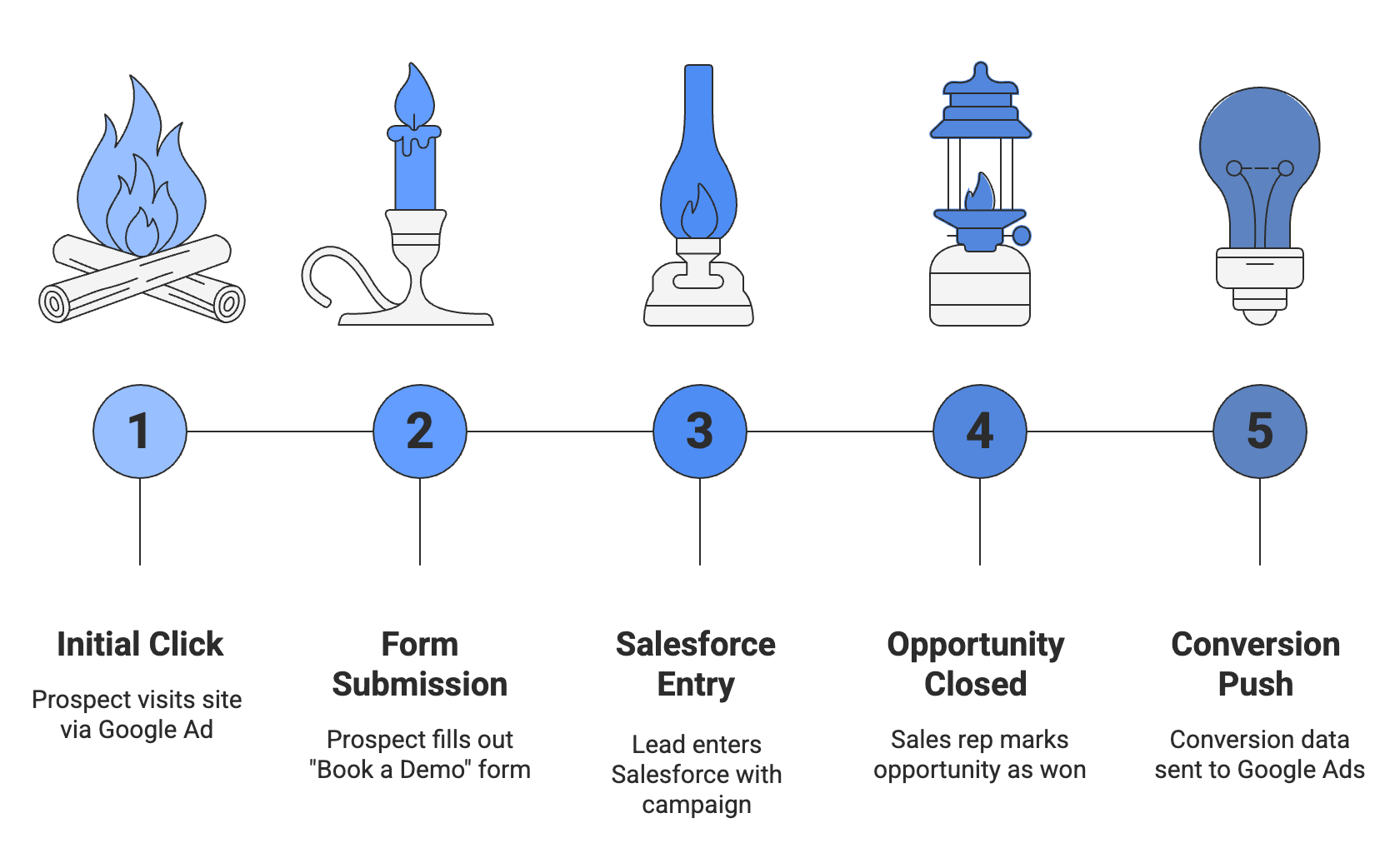
This kind of end-to-end visibility is what enables marketers to double down on what works. The previous example demonstrates the value of offline conversion tracking. Without it, you may encounter the following scenario:
- A B2B software company lead clicks on a Google ad for an enterprise product.
- The company's dashboard shows that the lead was one of 200 form fills at $50 per lead, totaling $10,000 in spend.
- The ROI is unclear because they couldn’t later connect these forms to revenue.
With offline conversion tracking in their Salesforce CRM, that same company would discover that 5 of those 200 leads closed as customers, totaling $100,000 in first-year contract value. More importantly, they would also be able to identify the specific keyword themes that drove four of those five deals.
With this information, they can shift budget to high-performing keywords and adjust Smart Bidding to optimize for SQL conversions. These changes lower CPL and improve pipeline quality.
Frequently Asked Questions
Does Offline Conversion Tracking Still Work with iOS 17 Restrictions?
Yes. Enhanced Conversions for Leads uses first-party data (email and phone) rather than browser-dependent tracking, so iOS restrictions have minimal impact. Server-side tracking further improves data capture regardless of device or browser restrictions. The key is moving away from reliance on client-side cookies and click IDs that browsers increasingly block.
Can We Automate Imports Without Third-Party Tools Like Zapier or Heeet?
Native options exist through Salesforce Data Manager and HubSpot’s Ads Tool, but they have limitations in customization and cross-platform support. For complex use cases, multiple conversion events, or real-time sync across several ad platforms, you’ll need either custom API development or an attribution platform. Consider the total cost: your team’s time spent on manual processes versus the subscription or development investment.
How Long Does It Take to See Results?
Expect two to four weeks for Smart Bidding to learn from new conversion data. Performance improvements typically become visible within four to eight weeks. For B2B organizations with longer sales cycles, the full optimization cycle often takes two to three months as closed-deal data accumulates and the algorithm refines its targeting.
Moving Forward: From Guessing to Connecting Every Click to Revenue
The gap between ad clicks and closed revenue doesn’t have to be a mystery. Offline conversion tracking bridges that divide, giving your ad platforms the information they need to find customers, not just leads.
Offline conversion tracking with Google Ads is a strategic advantage, not just a technical upgrade. Brands that succeed can prove the value of every marketing dollar. Syncing your CRM, capturing GCLIDs, and uploading closed deals enables precise measurement.
Start with the fundamentals: capture click IDs or implement Enhanced Conversions, define your pipeline stages as conversion events, and send that data back to Google Ads. Then shift your bidding strategy to optimize for value rather than volume.
The benefits go beyond improved ad performance. Proving which campaigns drive revenue makes budget discussions with finance easier. Sales alignment improves as you optimize for shared outcomes. Strategic channel investment decisions are based on data, not assumptions.
In paid acquisition, SEO, or customer success, demonstrating the link between touchpoints and revenue helps your organization understand campaign impact and justify marketing spend.
With this roadmap, you can finally connect marketing spend to revenue results.
Ready to connect your ad clicks to actual closed deals? For B2B teams running Salesforce or HubSpot, Heeet integrates natively with your CRM to automate offline conversion tracking across Google, Meta, LinkedIn, and more. No more manual uploads. No more guessing which campaigns work.
Measure closed deals, not just clicks. Book a demo now.

.svg)
Ready to track prospects from lead to close with Heeet?
Heeet gives marketers and sales professionals at IT & Security firms turn geuss work intro informed decisions that drive revenue while meeting the same secruity technical standards you provide your clients.