Read time :
How To Connect Linkedin Ads with Salesforce
LinkedIn Ads is one of the most powerful channels for B2B lead generation. But without a direct connection to your CRM, you're left guessing which campaigns actually drive pipeline. This guide shows you how to connect LinkedIn Ads with Salesforce using Heeet, so you can see the real ROI of every dollar spent.


What You'll Get
Once connected, Heeet automatically syncs your LinkedIn paid campaigns into Salesforce, giving you:
- Every campaign created as a Salesforce record, with live cost, impression and click data updated every hour
- Each LinkedIn lead automatically associated with the campaign it came from
- A direct comparison of LinkedIn performance against other channels like Google Ads or organic search
- Full cost-per-lead and cost-per-opportunity visibility, without any manual exports
Prerequisites
Before starting, make sure you have:
- An active Heeet account installed on your Salesforce org
- A LinkedIn Campaign Manager account with active or past campaigns
- Salesforce Admin access
Step 1 - Connect Your LinkedIn Account in Heeet
In your Heeet dashboard, go to Connectors and select LinkedIn Ads. Click Connect and authenticate with the LinkedIn account that has access to your Campaign Manager. Once authorized, Heeet will automatically pull in all your campaigns.
Step 2 - Campaigns Are Created in Salesforce Automatically
No manual setup required. Heeet creates a Salesforce record for each LinkedIn campaign, populated with:
Step 3 - Leads Are Automatically Linked to Their Campaign
When a visitor clicks a LinkedIn ad and later fills in a form on your website, Heeet captures the original source and associates the resulting Salesforce lead with the correct campaign. This happens automatically - no UTM configuration required on the LinkedIn side.
You can then see, on each campaign record, how many leads it generated and what those leads are worth in pipeline and closed revenue.
Step 4 - Compare LinkedIn Against Other Channels
Because Heeet applies the same attribution logic across all your channels, you can compare LinkedIn Ads performance directly against Google Ads, SEO, and other sources - all inside Salesforce. No spreadsheets, no stitching together data from multiple platforms.
Typical metrics you can now track per LinkedIn campaign:
- Cost per Lead (CPL)
- Cost per Opportunity (CPO)
- Cost per Closed Deal
- Pipeline influenced
- Revenue attributed
How to measure the ROI of your Linkedin Campaigns
Heeet allows you to automatically sync all your Linkedin paid campaigns with Salesforce in order to measure the ROI of each $ spent on Linkedin.
Once Heeet installed on your Salesforce org, you can easily connect with your Linkedin account.
All campaigns are automatically created in Salesforce with their current costs, impressions and clicks. Those data will be updated every hour.
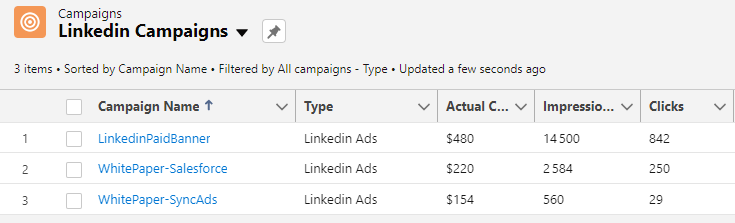
All your leads from Linkedin campaigns will be automatically synced with the campaigns they come from, allowing you to easily see the real ROI of each campaigns.

It will also allow you to compare easily how Linkedin performs compared to other channels
Summary
Connecting LinkedIn Ads with Salesforce through Heeet takes just a few clicks. Once set up, your campaign data syncs automatically every hour, your leads are tied to the exact campaign that generated them, and you can compare LinkedIn ROI against every other channel in a single view inside Salesforce.
Other articles
Salesforce Campaign Object: What It Is and How to Use It
How the Campaign object links members, contact roles and opportunities and why campaign reporting breaks without Campaign Influence set up properly.
How to Connect Salesforce and Google Ads
Connecting Salesforce and Google Ads is a powerful way to integrate your customer relationship management (CRM) data with your ad campaigns,
.svg)
Ready to track prospects from lead to close with Heeet?
Heeet gives marketers and sales professionals at IT & Security firms turn geuss work intro informed decisions that drive revenue while meeting the same secruity technical standards you provide your clients.